SoftWiz • Sales Floors • CRM • Smart Dialer • AI
How to Choose a CRM and a Smart Dialer for Your Sales Floor: The Complete Guide to Building a Modern Infrastructure for Small and Mid-Sized Businesses
Owners and sales managers at small and mid-sized businesses are under constant pressure: advertising costs keep climbing, lead quality fluctuates, competition intensifies, and reps struggle to keep up. Even when you pour more money into leads, it can feel as though the money is slipping through your fingers.
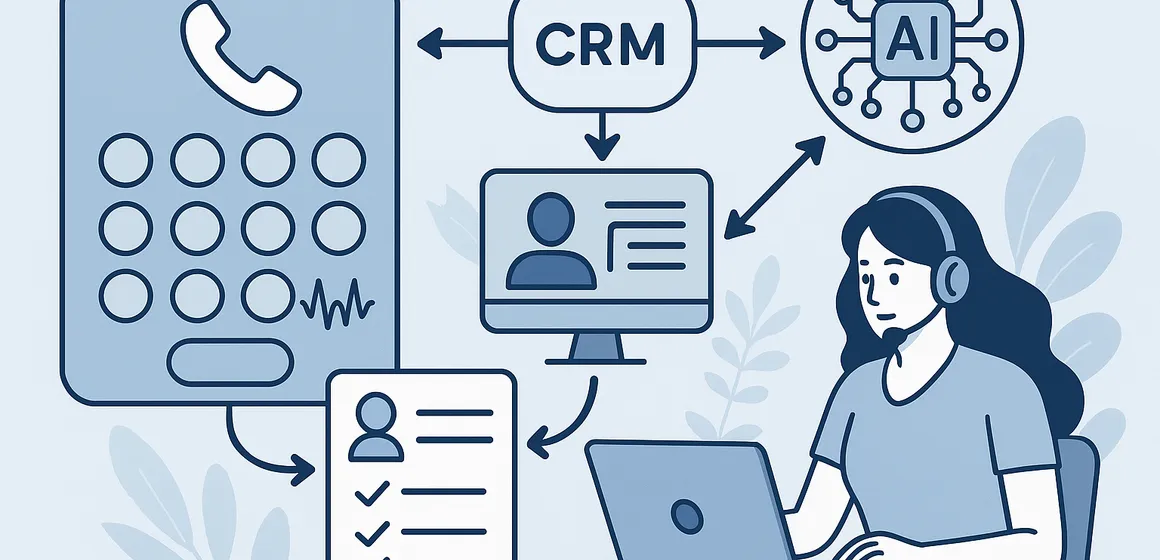
In most cases the problem is not lead quality at all, it is infrastructure: no CRM built for a sales floor and designed around phone work, no smart dialer to manage calls, no automations, and no intelligent use of AI to turn frontline activity into insight.
This article looks closely at how to build a modern sales-floor infrastructure: the difference between an auto dialer and a smart dialer, what a sales CRM must include, how AI fits into the sales process, and how to choose a single system, or a combination of systems, that works the way your floor actually sells. At the end we also show how a solution such as CallMarker fits this approach.
Bottom line: a modern sales floor cannot rely on telephony alone or on a CRM alone. It needs a complete infrastructure combining CRM, a smart or auto dialer, automations and AI, to raise output, improve close rates and stop wasting leads.
Chapter 1: Why Small and Mid-Sized Sales Floors Struggle to Grow Revenue
Most business owners describe it simply: “our leads aren’t as good as they used to be.” In practice, the problem is usually not the lead but the way the organisation handles it. Before blaming marketing, take a hard look at the operational infrastructure of the sales floor.
Common challenges in small and mid-sized operations:
- Leads that were never worked – leads that fall through the cracks because of missing records, missing tasks, or poor distribution between reps.
- Slow response time – leads that get a call an hour or two later (or the next day), by which point they have already spoken to a competitor.
- Heavy manual work – manual dialling, data entry, jumping between spreadsheets, email, WhatsApp and assorted systems, instead of working from one organised system.
- No visibility for managers – no simple answer to basic questions: how many leads came in today, how many were actually worked, who is the strongest rep, and where the profitable customers come from.
- Inconsistent working standards – every rep works differently: some log activity, some don’t; some follow up, some forget; there is no single process for the floor.
The upshot is that the business pays for leads but never fully exploits them. Rather than more marketing budget, what is really needed is the right operational infrastructure: a sales CRM, a smart dialer, and automations that lift everything other than pure selling off the reps’ shoulders.
Chapter 2: Why “Infrastructure” Matters More Than Picking One System
Many people go looking for “the perfect system.” In reality no single magic system suits every business. What does exist is an infrastructure model that defines how the sales floor should work and which technology components need to support it.
A modern sales-floor infrastructure is usually built from four layers:
- 1. A CRM for sales floors
The system that holds all information on leads, customers, processes, tasks and statuses, and gives you full control of the sales pipeline. - 2. An auto dialer or smart dialer
A telephony system that manages dialling and call load, removes manual work and produces effective calls back to back. - 3. An AI layer
Tools that analyse calls, spot opportunities, coach reps in real time and give managers insight. - 4. Automations and integrations
Connections between CRM, dialer, website, forms, email, WhatsApp and other systems, so information flows without double entry and without losing data.
When all four layers talk to one another, you get an efficient, transparent and measurable sales floor. When one component is missing, or the system does not suit the type of operation, you get breakdowns, wasted time and lost opportunities.
Chapter 3: What a Sales-Floor CRM Must Include
Not every CRM suits a sales floor. Some systems were born for service, project management or accounting, and they excel there. A sales floor calls for a different emphasis: speed, phone-based work, process discipline and simple record keeping.
A sales CRM should provide at least the following:
- Centralised lead management – leads arrive from every channel (website, campaigns, forms, WhatsApp, callbacks) into one place, with intelligent distribution to reps and a clear status on every lead.
- A simple, clear rep screen – the rep sees customer details, call history, previous notes and upcoming tasks in one place, without clutter.
- Pipeline management – a clear route from lead capture to closed deal: new, in progress, interested, in negotiation, closed, not relevant, and so on.
- Basic automations – automatic follow-up tasks, emails or messages, status updates and activity logging, so the rep does not have to remember everything unaided.
- Management reporting – how many leads came in, how many were worked, how many calls were made, who the top rep is, the conversion rate by source, and the estimated cost per closed lead.
- Smart dialer integration – the ability to dial from within the CRM, capture call records automatically and connect sales activity to actual results.
Pairing a sales CRM with an auto dialer or smart dialer is critical, whether that means one system that does everything or two connected systems.
Chapter 4: Auto Dialer vs Smart Dialer – How They Differ and When You Need Each
The term “auto dialer” has become common in recent years, but not every auto dialer is a smart one. The difference directly affects floor output and the number of effective conversations.
An auto dialer is the first step:
- Dials automatically from a lead list or from the CRM.
- Removes the manual work of keying in numbers.
- Produces a faster working rhythm than manual dialling.
An auto dialer suits small operations starting out, or businesses making a relatively low volume of calls that still want to stop wasting time on manual dialling.
A smart dialer / predictive dialer works differently:
- Analyses average call length, rep availability and working pace.
- Dials several leads in parallel and connects a rep only when a human answers.
- Sharply reduces waiting time between calls.
- Can prioritise hot leads or callbacks.
- Adapts to the rhythm of each operation and changes over time.
In real sales floors with meaningful lead volume and a team of several reps, a smart dialer is close to standard. It lets reps speak with far more customers in the same window of time, without adding technical work.
Chapter 5: Where Does AI Fit into a Modern Sales Floor?
AI systems are no longer a gimmick. They have become a day-to-day working tool that, used well, can change how a sales floor operates from the ground up.
Examples of AI applications on sales floors:
- Call analysis – automatic understanding of what was said, the customer’s intent, level of interest, recurring objections and call outcomes.
- Automatic call summaries – instead of a rep writing up what happened, the system produces a summary, tags and next actions.
- Lead prioritisation – identifying hot leads or customers at risk of churn, based on behavioral patterns and past calls.
- Real-time rep guidance – suggestions on which questions to ask, which points to sharpen, and even how to phrase them.
- Insight for managers – better reporting, based not only on numbers but on call content and context.
Combining a smart dialer, a sales CRM and AI creates a floor that does not simply talk more, but talks smarter, continuously optimising the sales process.
Chapter 6: Essential Sales-Floor Automations – What You Cannot Do Without
Automations are what separate a floor running on brute force from one running intelligently. They do not replace reps; they free up time for what really matters, talking to customers and closing deals.
Basic automations worth considering:
- Automatic follow-up tasks – any call that did not end in a close, or any customer who asked to be called back in a few days, becomes a task automatically, at the right time, for the right rep.
- Call logging – automatic recording of calls, status and basic outcome, attached to the customer record in the CRM.
- Integration with forms and campaigns – a website lead enters the floor automatically, with a task and a priority. No spreadsheets sent by hand.
- Messaging automation – a message to the customer after a call: confirmation, a short summary, a booking link, or simply strengthening the relationship.
- Automatic reporting – managers receive a daily or weekly email with the picture: how many leads came in, how many were worked, who stood out, and the conversion rate.
When automations are connected to the auto or smart dialer and the CRM, they create a complete process that does not depend on reps’ memory and stops leads leaking away.
Chapter 7: How to Choose a Sales-Floor Infrastructure – Practical Steps
Rather than starting with a list of systems, start with the business itself. Choosing the right infrastructure involves a few simple but critical steps.
Step 1: Map the current situation
- How many leads come in each month, and from which sources?
- How many reps work on the floor, and what does each one do?
- How are leads managed today, spreadsheets, CRM, WhatsApp, email?
- Where is the bottleneck, forgotten leads? No follow-up? Missing records?
Step 2: Define your goals
- Is the goal to speak with more leads?
- To raise close rates?
- To shorten response time?
- To reduce dependence on specific individuals?
Step 3: Choose an infrastructure direction
- One system covering CRM, dialer, telephony and automations.
- Or a modular solution combining a separate CRM, a separate smart dialer and an automation layer.
Step 4: Test real-world fit on the floor
- Do reps feel the system makes their work easier rather than harder?
- Can you enter a lead and come back to it repeatedly without losing it?
- Does the manager finally get a true picture of what is happening?
Chapter 8: All-in-One System vs Modular Solution – A Brief Comparison
| Parameter | All-in-one system | Modular solution (CRM + dialer + AI) |
|---|---|---|
| Time to go live | Relatively fast, less planning | Requires scoping, rolls out in stages |
| Future flexibility | Depends on one vendor’s capabilities | High – components can be swapped |
| CRM depth | Usually basic, floor-focused | Depends on the system – can be very deep |
| Smart dialer | Usually built into the solution | You can pick a dedicated, advanced dialer |
| Short-term cost | Usually lower | Usually higher at the outset |
| Long-term cost | Can become expensive if you have to work around limitations | Flexible, according to your tools and growth |
Chapter 9: Frequently Asked Questions on CRM, Smart Dialers and Sales-Floor Infrastructure
Do you need a CRM in order to use an auto dialer or a smart dialer?
Not strictly, but it is strongly recommended. You can start with an auto dialer alone, but without a sales CRM your records, tasks and control will remain partial. It is the combination of CRM and smart dialer that creates genuine infrastructure.
Is an all-in-one system right for every business?
Not necessarily. For small operations or businesses that want to be up and running tomorrow morning with a single solution, it can be excellent. For organisations that want more flexibility, or that are planning significant growth, a modular solution or a system with real depth and room to expand may be the better fit.
When is it time to move to a smart dialer?
When lead volume and headcount grow to the point where reps are losing time on manual dialling, unanswered calls and gaps between conversations, a smart dialer becomes a tool that multiplies output. If it feels as though the same people could be achieving more, it is probably time.
Does AI replace salespeople?
No. AI does not replace reps, it replaces some of the drudgery around them: logging, summarising, analysis, prioritisation and reminders. A good rep with good tools closes more than a good rep alone. The combination is what creates a real advantage.
When is the right time to build new infrastructure?
There are two typical moments: when you start to feel a loss of control (leads disappearing, no data), or when you are planning growth in leads or headcount. Waiting until something breaks is more expensive than putting proper infrastructure in place on time.
In summary: a modern sales floor at a small or mid-sized business needs to think like a large organisation, a single infrastructure connecting a sales CRM, a smart or auto dialer, an AI layer and automations. The result is less wasted time, fewer forgotten leads, more quality conversations and more closed deals.
If you are looking for a solution that puts all of this into practice, one system combining CRM, telephony, a smart dialer, WhatsApp, automations and AI, CallMarker is one of the leading platforms built on exactly this approach: an autonomous platform that analyses calls, identifies revenue opportunities and supports reps and managers in real time.
At SoftWiz we guide businesses and sales floors through implementing CallMarker as a complete floor infrastructure, from scoping, through implementation and automations, to building the reports and insights that turn calls and opportunities into actual revenue.